Powered by Blogger.
Showing posts with label google tips. Show all posts

Creed's Rom v3.0 and v3.1 for samsung galaxy y s5360

As before i have already wrriten a tutorial how to install creeds rom 2.1 on samsung galaxy y  so here i am going to provide you only short instructions and the list of required files if u need details visit how to install creeds rom on samsung galaxy y.

NEW: ROM WITH JELLY BEAN LOOK DOWNLOAD FROM HERE


Creed's Rom v3.1 for samsung galaxy y s5360, http://www.androidonkey.tk
  1. Download from link blow Rom zip file.
  2. Copy it to Sdcard Directly i.e in root directory
  3. Boot into recovery by pressing (Vol. Key Up + Home Key + Power Key)
  4. GO to CWM.Wipe Data, WIPE CACHE PARTION
  5. Select Install Zip From SdCard
  6. Choose the rom zip
  7. Install and Reboot
NOTE: IF U R USING  OTHER ROM (OTHER THEN GINGERBREAD OFFICIAL) PLZ FLASH STOCK ROM FIRST OR ELSE U WILL FACE BOOTLOOP )
Screen shot:
Creed's Rom v3.1 for samsung galaxy y s5360,http://www.androidonkey.tk

Creed's Rom v3.1 for samsung galaxy y s5360,http://www.androidonkey.tk

What is new in Creeds' Fusion v3.0?
Basic Features Like:
  • Root-(SU Access)
  • Deodex
  • ZipAligned
Other Stuffs:
  • Creeds' Home v2.0 ~Hot
  • 5 Docks
  • Auto Alphabetical Arrangement
  • 4x4 Icons on one Page of Menu (So You Get Total Of 21 Apps on one Page Instead Of Stock 16)
  • Infinite Home Screen Loop Removed
  • Upto 9 HomeScreens
  • Page Indicator At Bottom
  • Whole New Touchwiz UI
List View
  • Apps Background in List View
  • System Themed Lunar UI
  • Other Icon Packs of Lunar UI
  • Swipe to Remove Notification
  • Custom Bootanimation Enabled
  • Creeds' Signature Animations and other UI's
  • Transparent UI Look (You Can see Live Wallpapers/Wallpaper behing all apps)
  • Transparent Lockscreen
  • Status Bar Mods (Use EDT App)
  • Change Clock Colours to your wish
  • Change Battery Style to Your Wish
  • Battery Percentage Optional
  • Add Your Custom Text On Status Bar
Lidroid 14 Toggles
  • Use Quickpanel Settings to Toggle and Change Sequence (Optional,not included in rom)
  • Enabled Overscroll Mod in Toggles Area
  • Smaller Toggle area with no text or indicators like Cyanogen
Using MIUI Music Player
  • Keyboard Bug Fix from version 2.5 on transparent UI
  • Smooth Scroll
  • Minor Bloatwares Removed
Changes in Fusion v3.1
This is a Common Bug Fix Update of 3.0 .Dont Update if You Dont Have any Problems Using v3.0.
Apps Top Borders Fixed
3x4 Keyboard Fix
Added ICS Keyboard
And few more look for it 


Downloads:
Skin of CWM
Creeds rom v3.0
Creeds rom v3.1

Read More

Tutorial how to place Adsense ads inside bloggers post and parsed the code manually

Adsense ads inside bloggers post, www.androidonkey.tkTutorial how to place Adsense ads inside bloggers post after parsing the code manually. If you have a blog and have Adsense approved account you can easily place your Adsense ads just by using inbuilt Adsense gadget or by generating Adsense code and placing it in HTML/java script gadget in the side bar of the blog. But here we are going to show you how to place ads inside the post.  So if you want to display your Adsense ads in the middle of your post the follow the steps below:

  1. First of all log in your Adsense account and generate the ads code copy it and paste it on notepad.
  2. Now next step is to parsed the code here we will phrase our code manually to parse the code we will have to replace the following symbols to html tag.
    •  <  = &lt;
    • >   = &gt;
    • "    = &quot;
      After  parsing your code will look as shown below
      &lt;script type=&quot;text/javascript&quot;&gt;&lt;!--
      google_ad_client = &quot;ca-pub-xxxxxxxxxxxxxxxx&quot;;
      google_ad_host = &quot;pub-xxxxxxxxxxxxxxxx&quot;;
      /* mediumsquare */
      google_ad_slot = &quot;xxxxxxxxxx&quot;;
      google_ad_width = 300;
      google_ad_height = 250;
      //--&gt;
      &lt;/script&gt;
      &lt;script type=&quot;text/javascript&quot;
      src=&quot;http://pagead2.googlesyndication.com/pagead/show_ads.js&quot;&gt;
      &lt;/script&gt;

      If you can't do manually then click here to parse your code.

      Now log in to your bloggers dashboard click on layout and select Edit HTML.
      Then select the check button saying "Expand Widget Templates"
      Now click inside the html edit box and  press Ctrl+F a search box will appear copy and past this                 <data:post.body/>    in the box and click next
      Then look for the code below or something similar
      <div class='post-body entry-content' expr:id='&quot;post-body-&quot; + data:post.id'>
                  <data:post.body/>
                  <div style='clear: both;'/> <!-- clear for photos floats -->
                </div>
      Then past the parsed code just before the above code and click on preview button to see the result the ads will appear between post title and post it may take some time for your ads to be active say 5 to 10 munites keep passions.
      Then save the template all done enjoy.
      Read More

      Google Music available

      Google music now available for India at Google music
      Google music where you can Discover, Buy, Listen, Organize and share your favorite music that you love. There are hundreds of free songs and millions more to buy on Android Market.You can access your Music library anywhere and anytime. Any music you buy from Market will be stored in your Music library and you can add up to 20,000 of your own songs -- all for free. you can share a listen to your friend with G +1.

       At present thousands of full songs from there partners in.com, saavn and saregama. are available foe listeners.

      How to listen music from Google music
      Indian listeners click here When the page open click on the thumbs of film or album or Search for artists, albums or songs in search bar and click on search music.


      when you click on thumb you will be redirected to song selection page where you can select the song it will open a small window now click on play button to listen to music.

      Enjoy music.
      Read More

      Add g +1 to your website

      How to add G +1 button to your website

      Why to add +1 button to your site?
      +1 can help your site to stand out.
      +1 lets your visitors to recommend your content on search.
      +1 lets visitors to share your content on G+. etc. anyways lets see how to add


      Click Here
       There you will see Customize your +1 button and +Snippet. here we will only add +1 button.
      Here you can select the size of your button according to your choice.Small (15px), Standard (24px), Medium (20px) & Tall (60px).
      Next Annotation select from drop down menu bubble, inline (You may specify any width 120px and greater, but this preview will only display up to 450px.) & none.
      Next select your language.
      You can select advance for more option (Asynchronous, Parse, URL to +1, etc.)
      Now your code is generated copy and paste the code into your site where ever you like see the example below
      Read More

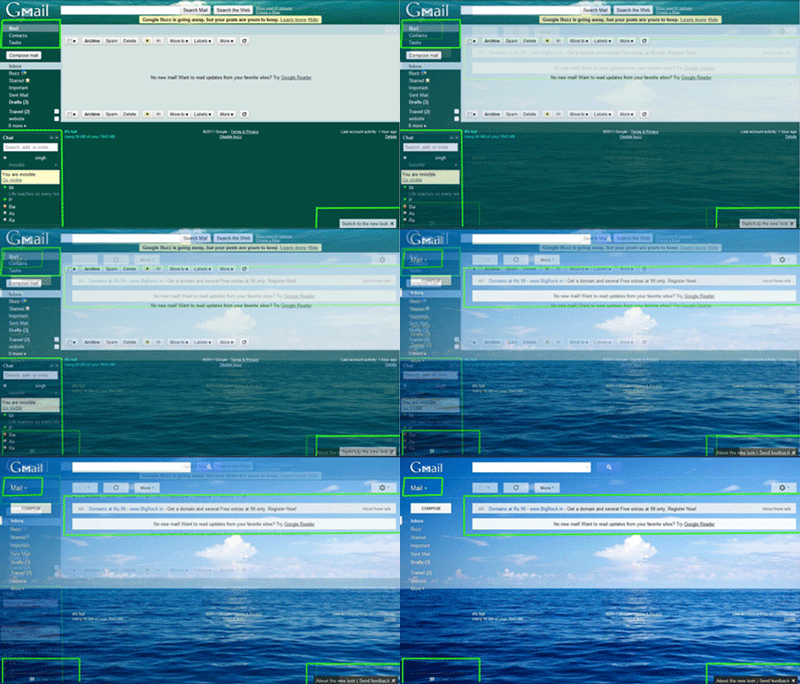
      "Gmail's" New Look, Now Available

      Gmail with new look now available

      New look to Gmail you can switch to the new look just by clicking on the pop up on the right-side down corner.


      Old to New Look Gmail
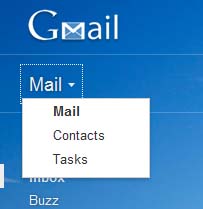
      On the upper left side below the GMail-icon can switch between Mail, Contacts and Tasks.


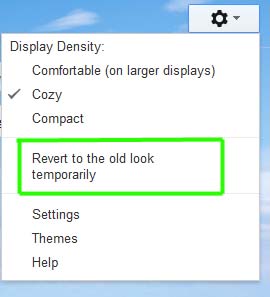
      you can revert to old look if you want from the setting menu here you can change theme, settings, Display Density, etc.

      Don't forget to leave comment
      Read More

      GOOGLE SPHERE

      See google home page contain in motion
      The MR Doob team have designed a webpage in which Google Homepage items move in clock wise or along with your mouse.It's really cool to see this.


      How to get this Sphere motion web page do as written below
      Open search setting & disable google instant
      Click Here
      Enter "Google Sphere" in the search box.
      Now press I am Lucky button
      OR
      Visit
      http://mrdoob.com/projects/chromeexperiments/google_sphere/
      Read More

      Today i came across a funny thing that is gravity pull on web page

      Today i came across a funny thing that is gravity pull on Web page usually we visit "Google" home page to search some thing. The MR Doob team have designed a web page in which Homepage falls down soon as you move cursor inside the page.You can also drag the fallen items left,right & up and play with it.It's really cool to see this.

      How to get this gravity web page do as written below
      Go here
      Enter "Google Gravity" in the search box.
      Now press I am Lucky button
      OR
      Visit
      http://mrdoob.com/projects/chromeexperiments/google_gravity/
      Read More