Powered by Blogger.

GT Racing Motor Academy

GT Racing Motor Academy
A game thus no need to Root your devise Just Install And play the game.........
Enjoy.
Here many Cars & tracks to play Choose your car arcade or survival & other option to play

Install And Extract Data File to directory gameloft/game/GTRacing/ "Here"
Download Apk LInk

Download Data Link
Read More

Sketch & Draw

A fun procedural drawing tool / sketcher

Features:
brushes + eraser/ Redo
Multiple Canvas sizes 480 x 320 to 1280 x 800
Canvas Zoom In or Zoom Out
Alpha Scale 0% - 100%
Color picker
Save to SD

Download Click here

Now sketch & draw like this


Download Click here
Read More

iFighter 1945

As the ace pilot of the airforce in WWII, your mission is to destroy the secret weapon prototypes of the Nazis. Fasten your seat belt and get ready for some non-stop action!
Features:
- 3 difficulty settings
- 5 different fighters
- 4 control modes: motion, touch, joypad and relative
- 8 challenging missions
- original sound tracks
- spectacular end-of-level bosses


Download Apk:-
Deposit Files
Uploaded
Exta Bit
Download Data:-
Deposit Files
Uploaded
Read More

Blood and Glory HD

Blood and Glory HD 4 Galaxy Y
1) Root your Galaxy Y
2) Download and Install Chainfire3D 3.3 Pro Click here
3) Download Chainfire3D plug-ins click here
4) Unzip the Plug-ins.zip archive in the SD card
5) Install Plugin in Chain fire 3D
6) The app will search for the plugins in the phone and prompt about them on the screen
7) Install all the plugins libGLEMU_NVIDIA.zip, libGLEMU_POWERVR.zip and libGLEMU_QUALCOMM.zip
8) Download the APK and the DATA
9) Install the game and press "Done"
10) Copy the DATA folder named 'com.glu.gladiator' in the SD card in Android/data/*HERE*
11) Open Chainfire3D and and open 'Default OpenGL Settings' and tick 'Reduce Texture Quality' and also tick 'Reduce Texture Size' and also tick 'Disable MapBuffer emu' and open 'Use Plugin' (Just Below the 'Reduce Texture Quality' tab) and select 'QUALCOMM'
12) Put your phone in the flight mode
13) Open the game & Enjoy the game!


Download Apk Link
Download Data Link
Read More

DEER HUNTER 3D

Deer Hunter 3D! The best-selling hunting game of all time is finally here!Download the best-selling hunting game of all time, and set your sights on deer, moose, bighorn sheep, bears, turkeys, and more in 30 scenic 3D environments.
Brave changing seasons and weather conditions. Unlock new weapons, skills, and hunts by bagging the biggest kills.
For the first time ever, you can view your proudest hunting moments in an interactive trophy room where you can view bullet trajectory, the exact position of your animal when killed, and any relevant bonus points earned for vitals, antler points, and cover. Based on the hit PC hunting game from Atari, Deer Hunter 3D is as real as it gets.
FEATURES
- Virtual hunting simulation with realistic 3D visuals
- Different types of animals with true-to-life senses and behaviors
- 4 worldwide locations with 30 different shooting locations
- Hunt “Easter Egg” animal (exclusively available for holiday seasons)
- Use your scope to zoom in for more precise and devastating kills
- Develop your hunter’s skills in accuracy, reflexes, endurance, and tracking
- Relive your best kills and achievements in the trophy room
- Unlock new weapons, skills and hunts by bagging the biggest animals


Install & Put the DATA folder named 'dh3d' in glu/*HERE*
Download Apk Link


Download DATA Link
Read More

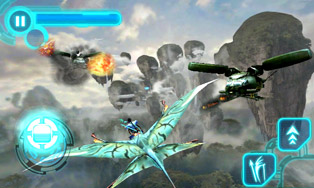
Avatar HD

Avatar HD on Samsung Galaxy Y Thanks to Game loft for making this game.
Follow these steps to Play it:-

1) Root your Galaxy Y
2) Download and Install Chainfire3D Pro Click here
3) Download Chainfire3D plug-ins click here
4) Unzip the Plug-ins.zip archive in the SD card
5) Install Plugin in Chain fire 3D
6) The app will search for the plugins in the phone and prompt about them on the screen
7) Install all the plugins libGLEMU_NVIDIA.zip, libGLEMU_POWERVR.zip and libGLEMU_QUALCOMM.zip
8) Download the APK and the DATA
9) Install the game and press "Done" 10) Copy the DATA to gameloft/games/avatar
11) Open Chainfire3D and and open "Default OpenGL Settings" and tick "Reduce Texture Quality" and "Reduce Texture Size" and open "Use Plugin" and select "POWERVR"
12) Put your Phone in "Flight Mode"
14) Open game & enjoy it............!


Download Apk Link
Download Data Link
Read More

New Rom for samsung galaxy y s5360 ChobitsDigitalisV1.2 ROM

Tutorial how to install ChobitsDigitalisV1.2 ROM on samsung galaxy y As you know that some times before i have written a post how to install creed's rom on galaxy y So here we are going to show you how to install  ChobitsDigitalisV1.2 ROM  (it is a modified rom) so that you can achive new look and feel on galaxy y s5360. Here we are just going to provide you a tutorial and link to the required files the original credit goes to HCFroyd247 from xda who make it possible for all to have new look and feel on galaxy y to certain extent. So first of all take a look on few screen shots of ChobitsDigitalisV1.2 ROM.
screen shot:

Features of ChobitsDigitalisV1_ ROM:


Fast, Stable and Beautiful
Deodexed APKs; Reindexed
Zipaligned; Batch Optimized
Cyan Themed UI;Skinned Apps
Go Launcher EX as default home launcher
Superuser Access; Busybox Support
Supports Dartktremor's A2sd; Init.d scripts
Compatible with V6 Supercharger
Google Music; Gingerbread Keyboard; Swype
Fixed xLoud; Beats Audio; Bravia Engine Port
Build.prop tweaks; Boot Animation with Sound

Added Features:

Listnote; Fast Reboot; Where's My Droid?
Quick Settings; 14 Toggles by lidroid rom
Alarm Droid and more to come

Installation
Tutorial how to install ChobitsDigitalisV1_ROM on galaxy y
Sure to back up your data (recommended) before you proceed to next step.
Work on stock rom.
Download ChobitsDigitalisV1_ROM.zip from this Here
Now place your downloaded file to root directory of your sd card.
Now switch off your phone and boot in recovery mode. By pressing this keys together (Volume UP + Home Button + Power Button). Touch screen becomes function less in recovery mode so use volume up & down to move up and down and home key for making selection 
Now first of you have to Select wipe data and select the yes. 
Next Select "cache partition" 
Now after data wipe and clearing cache partition select 'apply update from sdcard' in recovery menu and select the file that you downloaded and placed on root directory of your sd card and select yes
After file gets installed you will return to main menu of recovery mode. Now select “reboot system now” from the menu and your phone will reboot it may take few minutes.
Once it fully loaded,after reboot tap "Menu + Preferences + Backup/Restore + Reset to default" to ensure that you have the default desk settings loaded.

Now update to ChobitsDigitalisV1.2 ROM
This update can be only apply to  ChobitsDigitalisV1_ROM do not try with other rom.

Screen shot


New Features added to ChobitsDigitalisV1.2 ROM
 Google Play Store; Google Search Updates; Font Reset
 Full Bravia Engine Port; Dalvik Heap Change; Tweaks
Addons: Notification Toggle (highly customizable; can add app shortcuts)
LCD Density Changer for bigger screen space(mine is set to 99; FM radio only works at 120 density)
Some UI optimizations; changed default lockscreen wallpaper 

How to update
The procedure is almost same as above.
Download ChobitsDigitalisV1.2 ROM update from Here. place on sd card root dir.
 Reboot and enter Stock recovery by pressing this keys together (Volume UP + Home Button + Power Button) no need to wipe data.Select update from sd card and select CDigitalisV1.2_UPD.zip when update complete  reboot.
Enjoy new look on your s5360.
Read More