Powered by Blogger.
Showing posts with label android tips. Show all posts

How to share wireless internet connection from android mobiles?

Today’s technology has brought enormous benefits to humanity. It values life precious treasures like time, family and health. These technologies even put a touch of humanity’s value of friendship through sharing.

It began when a great scientist invented the telephone using primitive circuits to connect to the other line. Now, telecommunication has never been so good until smart phones where invented by individuals who pushed their limits to bring a new gadget where technology can interact with the living mortals.
How to share wireless internet connection from android mobiles?
They call it smart phone. Like Darwin’s theory of evolution, the ancestor of this very futuristic cell phone has experienced drastic renovation, treatment and most especially adaptation to the changes and demands of time. These changes molded this phone into what it is right now. Whether what specie of Smartphone it is, it is still the best phone of the present time.

The new android smart phone delivers a new way it should be treated. These phones were built not only for communication, but they were built to be the companions of humans. These phones are purposely for the total e- buddy of any individuals. They were built to pacify the pressures humans experience from the demands of the ever developing world.

To be more specific, android mobile smart phones can be used as a wireless internet router to connect almost five internet capable gadgets to the internet. Computer engineers call it a internet “hotspot” device. To share your internet connection with other gadgets, here are the three simple steps that you can follow.

  1. Check that your android phone’s OS is at least in Froyo 2.2 or above.
  2. You must have a modest battery life for tethering may require more energy.
  3. Switch on the hotspot button of your android smart phone and to have a faster internet connection, use free sites to find cable providers in your area that could provide you with the best offer in mobile internet plans.
That is a simple way to tether your phones to other devices. However, the most common problem users will experience is they cannot connect or send signals to other devices even if they done all of the steps. In that case, don’t blame it right away to the phone’s capabilities of being a Wifi hotspot.
Because this is internet data sharing, the verdict for the delivery of this service is in the jurisdiction of the network providers. Most of these companies charge tethering to 2 more devices. The bottom line is, the development of this feature to android smart phone has a modest intention. However, business is business and users should deal with it.

Contributed by
 About the author: Jashon Wills
Read More

Download Adobe Flash player 11 for samsung galaxy y s5360 or armv6

Download Adobe Flash player 11 for samsung galaxy y s5360 or armv6 android devices running on android 2.3.4,  android 2.3.5, android 2.3.6. It is available for free download on play store for supported devices but to use it on Samsung galaxy y or other ArmV6 device you will have to download from the link provided below.
Download Adobe Flash player 11 for samsung galaxy y s5360 or armv6
Tutorial how to install and use Flash player 11 and play flash file on Samsung Galaxy Y or any armv6 based android phone successfully while browsing web that contains flash files. As till now Adobe flash player is not supported by this devices officially. So here is a simple way to run flash file while browsing web on samsung galaxy y s5360 or armv6 android devices. Bring the full web to your device with Flash Player- videos, games, apps & more. Adobe Flash Player enables a complete web browsing experience by enabling access to your favorite interactive content.

Simply follow the steps below:

Step one first of all you will have to install UC Browser on samsung galaxy y or armv6 android devices to download UC BROWSER click on this link Download UC BROWSER free as no other browser is till now supported.
As now you have installed uc browser now you have to download adobe flash player from this link DOWNLOAD FLASH PLAYER 11 FOR Samsung Galaxy Y or ArmV6
Now place this on your sd card and install it. Now run your uc browser and enjoy your favorite interactive content of web on galaxy y or any armv6 android phone
You can also check the version of flash player installed by searching "what's my flash version" in Google and follow appropriate link.
For other supported devices download flash player from here
Read More

Hells Fusion Kernel for Samsung Galaxy y gt-s5360 (custom)

Hells Fusion Kernel for Samsung Galaxy y gt-s5360 (custom).Its a custom kernel built from samsung source.The kernel is tested and working on DDLF firmware. Its pretty much a basic kernel with a little more features.The credit to developed this custom Kernel for Samsung galaxy y goes to  hell_lock member of xda forum so if you find his work useful don't forget to thanks him.

Other kernels:
Merruk  Kernel v2.0 final


Screenshots:
Hells Fusion Kernel  for Samsung Galaxy y gt-s5360 (custom)
Features:
  • Droidwall supported
  • Init.d support
  • Ext3,2 support wid NTFS
  • Performance fixes
  • Swap support
  • 7 frequencies for ultimate backup
  • 832 Mhz(undervolted already to save battery)
  • 624 Mhz
  • 468 Mhz
  • 312 Mhz
  • 156 Mhz
  • Deep sleep
  • 16 governors for people with different tastes
  • performance
  • powersave
  • userspace
  • conservative
  • lagfree
  • interactiveX
  • savagedzen
  • scary
  • brazilianwax
  • hotplug
  • smartass2
  • lionheart
  • smoothass
  • lazy interactive
  • 3 io schdulers
  • cfq
  • noop
  • deadline 
Download:
Kernel Flasher:(not mirrored) Kernel Update.zip
Hells Fusion  Kernel:(not mirrored) boot.img ( size:4.51 MB)

Warning
This kernel is only meant for Samsung galaxy y model gt-s5360 and not for other devices.Use it at your own risk we will not be held responsible for any damage that happens to your device following this instruction!

Installation:
  • Download kernel flasher from the link provided above and put it on sdcard
  • Put the downloaded kernel "boot.img "on sdcard
  • Switch off phone
  • Boot into cwm 
  • Install "kernel flasher" from zip
  • Reboot phone
Congratulation! If you see a new splash image after restart then the kernel has installed successfully if you notice any bug post on thread page so dev may fix on next update.
Read More

Collection of few best and cool Boot Animation for Samsung Galaxy y Gt-S5360

Collection of few best and cool Boot Animation for Samsung Galaxy y Gt-S5360. Hi here i have collected few best and cool boot animation for galaxy y with resolution 240X320. This boot Animations are developed by different Developers and if you like their work don't forget to Thanks them for their work. Few of the boot animations are flash-able for others see instruction below.
List of few best boot Animation for galaxy y Gt-S5360

SAMSUNG GALAXY SII
S 2 Boot Animation for Samsung Galaxy y
    Credit for this Boot Animation
evanlocked XDA member

DOWNLOAD: Link
SAMSUNG GALAXY  SIII
S 3 Boot Animation for Samsung Galaxy y
Credit for this Boot Animation
explodeaamir XDA member

DOWNLOAD: Link
WINDOWS PHONE 7
WINDOWS PHONE 7 Boot Animation for Samsung Galaxy y
   Credit for this Boot Animation
explodeaamir XDA member

DOWNLOAD: Link
NOKIA START-UP
NOKIA Boot Animation for Samsung Galaxy y
Credit for this Boot Animation
winterfoxy XDA member

DOWNLOAD: Link
HTC SENCE GLOSSY
HTC SENCE GLOSSY Boot Animation for Samsung Galaxy y
Credit for this Boot Animation
explodeaamir XDA member

DOWNLOAD: Link
HTC SENCE WHITE
HTC SENCE WHITE Boot Animation for Samsung Galaxy y
Credit for this Boot Animation
explodeaamir XDA member

DOWNLOAD: Link
TPB PLAZMA
TPB PLAZMA Boot Animation for Samsung Galaxy y
Credit for this Boot Animation
arindam4u XDA member

DOWNLOAD: Link
NEXUS 7
NEXUS 7 Boot Animation for Samsung Galaxy y
Credit for this Boot Animation
kenjilucas19 XDA member

DOWNLOAD: Link

Warning:
Use at your own Risk!

INSTALLATION iNSTRUCTION:
  • Not all bootanimation are flashable 
  • Download the file.
  • Open the bootanim zip file and extract it Copy it to SDcard.
  • Using Root Explorer, goto /sdcard and copy bootanimation.zip(the extracted file).
  • Goto /system/media/, mount it in r/w mode. Then paste it there system»media.
  • Change permissions as below.
  • rw to rr
Congratulation!
Read More

Vanilla Music player for samsung galaxy y an android phone with customable widget

Vanilla Music player for samsung galaxy y an android phone with custom-able widget
This opensource music player apps its nice music and best opensource music apps that comes with lots of feature.This app was modded to widget setup so we can change the widget theme by choose one of the theme on the list and shared on XDA by kill3d so thanks him if you like. So lets see some screenshots of Vanilla Music player on samsung galaxy y.
Screenshots:


Download:

Installation:
Install VanillaMusic-update-3.apk then place skin as instructed below

How to change the skin of the widget
  • Just put your theme.krbl on /sdcard/VanillaMusic/dcsmstheme/
  • Open the apps.. press menu go to setting/widget skin .. tap on the theme u wanna use then choose apply..
  • Go to ur homescreen. add dcsmsmusic widget...

How to create your own theme
  • just extract those sampletheme.krbl using 7zip or another archieve manager and change the image and desc.xml
  • frame.png is the frame for the widget
  • mask.png is the mask area for the music cover
Value in desc.xml
  • coverx is the left value for cover padding from the widget
  • covery is the top value for cover padding from the widget
  • tinggi is the height size of the cover
  • lebar is the width size of the cover
  • select the /theme and desc.xml > send to zip and rename it to urthemename.krbl
Enjoy
Read More

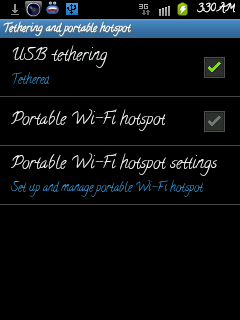
How to Share or connect internet from Android phone to pc or laptop

How to Share or connect internet from Android phone to laptop using usb cable To share internet from your phone to pc or laptop is very easy below are the steps how to use your phone internet using usb cable.


  • Install kies on your pc or laptop for required driver.
  • Connect your Android phone to pc or laptop using usb cable.
  • Now your phone shows that it is connected by usb in status bar.
  • Go to Home > Settings > Wireless and Networks > Tethering and portable hotspot>USB tethering


Select USB tethering Now your status bar icon changes to blue and you are connected to internet on your pc or laptop start browsing.
Read More

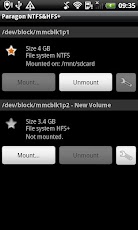
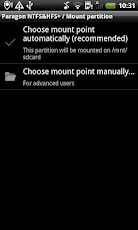
Paragon NTFS & HFS+ mounts almost any external hard drive on an Android phone or tablet

Easily mount NTFS/HFS+ formatted USB drives or SD cards on your android phones and tablets.Forget about incompatibility issues between your mobile handheld and its big brothers PC and Mac!
Paragon NTFS & HFS+ mounts almost any external hard drive on a phone or tablet
The software was successfully tested by nearly 50,000 Android enthusiasts! Get full and unlimited access to the most widespread file systems in the world on your smartphone by mounting USB sticks or SD cards formatted to Windows NTFS or Mac OS X HFS+.Now you can easily copy, transfer and modify data previously unsupported by Android volumes. Software company Paragon hopes to make Android phones and tablets compatible with drives formatted for Mac or Windows. NTFS and HFS+ for Android, It will work on almost all devices running Android on 2.3 or higher, but the devices must support USB storage, like the Xoom, Galaxy Tab, or Galaxy S III, and the device must be rooted, and use an adapter to connect the hard drive.

Screenshots


Download
                  Link
Read More

Arabic Language Pack for Samsung galaxy [DXLF1 Firmware]

Hi here is Arabic Language Pack for Samsung galaxy Y.This language pack is shared on xda by by senior member zalzondabuzz so Dont forget to thanks him. This package includes
  • Arabic activator 
  • Smart keyboard (for better arabic text)
  • more local app (to add many languange)
  • DroidSansArabic font
Screenshot:
Arabic Language Pack DXLF1 Firmware for Samsung galaxy Y
You have to flash this pack in CWM (Clock Work Mode)
Download
Package Name:(not mirrored) ArabicPack+icskeyboard_DXLF1_GT-s5360_zalzondbz@xda.zip
Size: 11.41 MB

After Flashing do this setting :

More locale Setting:
  • open app
  • Tap on Menu and tap "Add locale"
  • Give a Label
  • Choose Arabic language
  • Chose United Arab emirates for country.. 'Add'
  • Then choose arabic
Smart keyboard Setting :
  • Open Setting
  • Choose local and text 
  • Then Choose smartkeyboard pro 
  • Choose "language" then choose "Current language"
  • Then choose arabic
Congratulation you have installed Arabic Language Pack on your Samsung galaxy Y. If you notice any bugs post on thread page so that dev can fix it on next update
Read More

XPERIA Cosmic Flow

XPERIA Cosmic Flow ia a launcher for android devices it is Really nice launcher So just have a on few screen shot . it realy provide you nice ui for your device.This launcher have XPERIA user interface previously we provided you with details on how to install Xperia Arcui launcher on galaxy y or any qvga android phones with 240x320 screen for details click here
XPERIA Cosmic Flow

Download Link
Read More

Chrome Browser for galaxy y Armv6 Android Devices

Chrome Browser for Armv6 Android Devices. The speed and simplicity of Chrome Browser, now on your Android Armv6 phone and tablets search and browse faster with Chrome Browser on your Android phone and tablet. Sign in to sync your personalized Chrome experience from your computer to bring it with you anywhere you go. 
Chrome Browser for Armv6 Android Devices
Features:
  • Search faster.
  • Search and navigate fast, directly from the same box. Choose from results that appear as you type. 
  • Browse faster with accelerated page loading, scrolling and zooming. 
  • Simple, intuitive experience 
  • Open and quickly switch between an unlimited number of tabs. On your phone, flip through tabs the way you would fan a deck of cards. On your tablet, swipe from edge to edge to switch tabs.

Download:
                Google chrome arm v6 link 
Read More

Beats Audio + Bravia Engine + xLoud for samsung galaxy y

Here are few nice enhancement for samsung galaxy y s5360 which can increase user experience related to audio and video. This was developed by Yash98 member of xda so thanks for his work. This package include Beats Audio, xLoud and Bravia Engine for samsung galaxy y. So lets get few details about this.

Beats Audio:

Beats Audio for samsung galaxy y

Audio enhancement technology by HTC for its phones. Best noticeable in headphones.
xLoud :
Audio filter technology by Sony, it should increase clarity at loud volumes.

and 

Bravia Engine:
Better photo quality on the mobile display , adjusts brightness, saturation, colours by Sony.
This does not conflict with DSP Manager. TESTED ON COD's ROM with NO LAG. Note:- you people are right it does not work with PlayerPro and other equalizers.


Download Link

warning:
Use at your own Risk

Install instructions:
  • Download the file and place it in your SDCard. 
  • Boot into recovery, install zip from sdcard choose CWM.zip.
  • Go to install zip from sdcard and choose the downloaded file. 
  • Reboot after install completes
  • .
 Congratulation! you have successfully installed if you find any bug post on thread page so developer can fix it on next update.
Read More

uTorrent App For Android Now Available To Download

Find torrents and download them directly to your Android smartphone or tablet. As we know that there are many torrent clients for android but in terms of clients, uTorrent is easily the most popular.As we all know recently VLC, was released to the Google Play Store as a beta, and this time we have one of the most popular torrent client that is uTorrent. As for now µTorrent for Android (Beta) is currently free, and best of all, there's no speed or size limits! To get the best performance and avoid running up your data charges, we recommend taking advantage of WiFi whenever possible.Although the uTorrent app for Android, seems pretty stable, but can wait for final release.

As we all know that the uTorrent desktop client has always been free, but according to the description in Play Store we can see that it is on currently free so it’s better grabbing it.

Download: 
              uTorrent for Android on Google Play
Read More

Blazing Hatred CUSTOM ROM for samsung Galaxy Y

Here is Another custom Rom for Samsung Galaxy Y the Blazing Hatred Rom. This Rom is based upon the InfectedAblaze v2.5.2 and has hence named it Blazing hatred according to dev. This Rom is developed and shared by senior member of Xda forum aadaars. This Rom is based on DXKL2 .So here is few Screenshots of galaxy y running on Blazing Hatred Rom.

Screenshots:


Blazing Hatred CUSTOM ROM for samsung Galaxy Y     Blazing Hatred CUSTOM ROM for samsung Galaxy Y

Features:
  • Based on DXKL2 
  • De0dexed 
  • Zipaligned 
  • DSP Manager 
  • Auto Zipalign at Every Boot 
  • init.d & Busybox Support 
  • Sqlite3 added 
  • sqlite.so & ssqlite_ini.so from ICS(Improves Performance) 
  • Removed Samsung Bloatware 
  • iLauncher 
  • Google Music 
  • Tweaked for faster performance and better battery 
  • Ultra Fast 
  • As ilauncher is there so there will be no homescreen..U can use ur desired launcher if u want 
Download:
Rome Name: Blazing Hatred Rom  
Size:97.46 MB

Warnings:
This Rom can be only used on galaxy y s5360 and not on any other device. Use at your own risk . we will not be held responsible for whatever happens to your phone while following this instructional guide
INSTRUCTIONS:
  • Download zip and put directly in memory card 
  • Turn Off phone 
  • Boot in Recovery (Volume Up + Home + Power) 
  • Wipe Data 
  • Apply Update from SDcard 
  • Select Install zip from SDcard 
  • Then select Choose Zip from SDcard 
  • Click on blazing hatred v1.zip 
  • It will install 
  • Go back using power button and click Reboot System 
  • First boot will take time but wait. 
Congratulation! you have successfully installed the Blazing Hatred Rom on your Samsung Galaxy y GT-S5360 if you find any bug post on thread page so developer can fix it on next update.
Read More

The CoD RoM for samsung galaxy y S5360 with kuro kernel

Yet another Custom Rom for Galaxy y CoD RoM based on latest Stock firmware DDLF2. The CoD Rom is based on stock DDLF2 with ICS Trans theme is used as an extra theme along with Creeds Rom and Kernel used in this Rom by dev is kuro kernel (a lil bit modified init.rc file to allow system to handle CPU) as because Kuro kernel it is smooth, fast, minimalistic and stable. This Rom is developed by deepakjoshid007 senior member of XDA so thanks him for his work .This Rom doesn't support apps2sd as the kernel doesn't support it you can use Link2SD or you may use kuro script to mount ext partition as "data". Lets have a look on few Screenshots of galaxy y running on CoD RoM

Screenshots:

The CoD RoM for samsung galaxy y S5360 with kuro kernel

More Screenshot Here

Main Features
  • Fully transparent UI with JellyBean and ICS feel.
  • Modified stock apps no third party apps at all ( just one xperia launcher)
  • Improved swipe to remove notifications
  • 6 lockscreens 
  • Stusbar tweaks + 15 toggles (EDT)
  • Features come from the kernel like governers and frequecy init.d.
  • Bravia Engine integrated
  • Fast and stable 
Miscellaneous Features
  • Fully Deodexed , Zipaligned.
  • Removed some bloatwares.
  • Extended Settings app
  • ICS like Dialer and Phone app.
  • Statusbar fully jellybean themed.
  • Transparent MMS app with skins , removed auto SMS to MMS conversion and increased recipents limit.
  • Transparent Gtalk, contacts, music app.
  • New market with wish list and no restrictions ( But you only can see the app downloading not compitible app may or may not work) (credits to original poster)
  • All google apps already updated and market update compatible.
  • Smooth scrolling through disabled scrolling cache.
  • Added init.d scripts for batter performance ( Thanks to Kurotsugi again).
  • Xperia launcher with settings and already integrated Meego Icon theme.
  • Extended Power Menu 
  • Multiple language support.
Downloads:
Device Name: samsung galaxy y model GT- S5360
Rome Name (not mirrored): CoDRoMv1.zip
Size: 109.76 MB
Extra Google Apps: Gapps.zip
Size:  11.69 MB

Warning:
This custom Rom is only meant for Samsung Galaxy y GT-S5360 and not for other devices. Use it at your own risk we will not be held responsible if you brick or damage or whatever happens to your device while following our instructional guide.

Installation Instruction:
  • Backup your system and charge battery full before proceeding. 
  • As this Rom is splitted in two parts one is the Rom and other is Google Apps download both CoDRomv1.zip and Gapps.zip from the link above.
  • Put both the zip files in the root of your's phone SDcard
  • If you dont have CWM then download it also and put it on the root of your SDcard and turn your phone off.
  • Reboot into recovery mode then flash the cwm zip and get into cwm recovery and backup your current Rom.
  • Now go CWM recovery's advance option and reboot the recovery then wipe data and cache from stock recovery.
  • Flash again CWM recovery and wipe data and cache there also.
  • Now select install zip from SDcard and select CoDRoMv1.zip
  • Wait till it gets installed then wipe data and cache(optional) and reboot.
  • It will take time to reboot just wait..............
  • Use the Rom for sometime play around with the settings see if everything is working or not
  • After using your phone for around 15 mins reboot into recovery and flash Gapps.zip and reboot.
Congratulation! you have successfully installed The CoD RoM on your Samsung Galaxy y GT-S5360 if you find any bug post on thread page so developer can fix it on next update.
Read More

Thunder-Desert v3 Custom ROM for Galaxy y GT-S5360 { ThunderROM }

Hi friends as we all all know that Samsung galaxy y is one of the popular low ended android device and its development regarding apps and custom Rom's is very fast and for that thanks to all the developers who made this possible every day we have some new taste for our galaxy y in back we have posted many instructional guide on how to install custom Rom's Like Creeds Rom v 2.0, v3.1, v 3.2 and creed's Rom v 3.5, Next2ICS ROM v2.0 with Jelly Bean Themed, EVO-X Custom Rom etc. So this time here is a new custom Rom known as [ThunderROM] Thunder-Desert v3 Custom ROM for Galaxy y GT-S5360 this Rom is developed by shocklads senior member of XDA so don't forget to thanks the dev. So lets have look on few Screenshot of Thunder-Desert v3 on galaxy y.

Screenshot:

Thunder-Desert v3 Custom ROM for Galaxy y GT-S5360 { ThunderROM }
New Features:
  • Stable and Faster (with V1)
  • Fix (all) bugs. (Wifi faster connect)
  • All features etc. (like v1)
  • Special: can play Flash Player.
Download:
Device Name: Samsung Galaxy y GT-S5360
ROM Name:(not mirrored) ThunderROMv3.zip
Size: 86.56 MB

Warning:
This custom Rom is only meant for Samsung Galaxy y GT-S5360 and not for other devices. Use it at your own risk we will not be held responsible if you brick or damage or whatever happens to your device while following our instructional guide.


Installation Instruction:

  • Backup your system and charge battery full
  • Download rom and place it in root directory of sdcard and turn your phone off.
  • Now Boot in Stock Recovery mode by pressing(Vol Up + Home + Power button) together 
  • Select "Wipe data/factory reset" - Yes
  • Select "Wipe cache partition" - Yes
  • Select "Apply update from sdcard"
  • Install "ThunderROM.zip" rom
  • Reboot your phone.

Congratulation! you have successfully installed Thunder-Desert v3 Custom ROM on your Samsung Galaxy y GT-S5360  if you find any bug post on thread page so dev. can fix on next update. 
Read More

SD-Booster speeds up SD-Card speed of your Android smartphone

SD-Booster speeds up your external and internal SD-Card (external and internal memory) up to 40 times. Enjoy a new feeling of speed on your Android smartphone anytime and everywhere you are.Starting apps, listing to your favorite music or just swapping data with your PC ? Whatever you do, the SD-Booster improve your phone speed. SD-Booster needs root permission to run, otherwise SD-Booster will not work. Don't move SD-Booster to your SD-Card, otherwise SD-Booster doesn't work on boot.
SD-Booster speeds up SD-Card speed of your Android smartphone
Features:
MMC detection framework to support any SD-Card
Speedup every external and internal SD-Card
Set on Boot
Color based suggestion terms of current cache size

Download
                 SD-Booster APK Link
OR
                 Google Play Link
Read More

TouchWiz UX Launcher & Widgets of s3 for android phones and tablets (used on galaxy y)

Launcher & Widgets of s3 for android phones and tablets. TouchWiz UX launcher from galaxy s3 this is actually modified version of Holo launcher. but this modified version of holo launcher looks almost same as touchwiz UX launcher from galaxy s3 and also added some animation of touchWiz UX This beautiful launcher is shared by hmahadi98 on xda dont forget to thanks thanks dev. Here are some of the screenshot of touchwiz UX launcher running on galaxy y.


TouchWiz UX Launcher  of S3 for galaxy y

Just install this launcher and just do not update it after installing this launcher, if it ask's for update  don't update.

Download
           Touchwiz UX launcher from galaxy s3 link

Accuweather clock of galaxy s3: here is the great widget of galaxy s3 this is the original accuweather widget of galaxy s3 found it from a xda thread. just download it,open zip,then install it and hold on home screen(where u wanna place it) then select widget and chose accuweather clock.

Download
                Accuweather clock of galaxy s3 link

Screenshot
Accuweather clock of galaxy s3 for galaxy y
For more features from S3 like Change Icon , Wallpaper, Boot Animation,Video Player of Galaxy Y and achieve look of New Galaxy SIII on galaxy y follow this link
Read More

MegaBassBeats audio sound enchancer for galaxy y GT-S5360

MegaBassBeats audio sound enhancer for galaxy y GT-S5360  on cm7. As we all know that galaxy y have low sound so this will help to increase sound of your galaxy y phone. MegaBassBeats audio sound enhancer for for galaxy y GT-S5360 was developed by Senior Member of XDA forum D3HuM4NiZ3D so if you like his work do not forget to thanks him.
increase sound of galaxy y with MegaBassBeats audio sound enchancer
Features:
  • Much better than beats audio and SRS!
  • Clear sound!
  • Ultra clear bass!
  • Bass is clear even if its enhanced in DSP!
  • Louder!
Warning:
Use at your own. we will not be heald responsible if something happens to your device!

Installation Instruction:

  • Copy the .zip to root directory of yours phone Sd Card
  • Boot in to the recovery. {For how to boot in recovery mode click here}
  • Select Install .zip from sd card and choose MegaBassBeats_sgy.zip file.
Download:
                   MegaBassBeats_sgy Link
OR
                   Thread Page Link


Enjoy enhanced Sound on galaxy y
Read More

Smart RAM Booster for Android Phones and Tablets

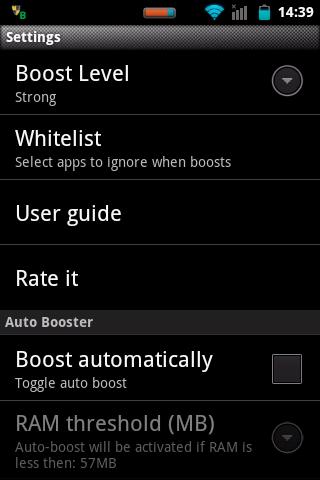
Smart RAM Booster for Android Phones and Tablets the most beautiful part of this app is a small, configurable widget that places on top of any app and one-click to RAM boost. Most of Android devices bundle with limited memory. Android task manager will selectively kill low-priority tasks in order to reserve memory to higher priority task. That’s not always run at an appropriate time, causing low responsive apps, lagging, especially when you launch a new app after heavily browsing web pages. It causes a worse experience.

How RAM Booster works

  • RAM Booster is designed to overcome these issues by selectively kill less important apps that are running in the background but consumes considerable device’s memory.RAM Booster comes with auto-boost in 4 levels: aggressive, strong, medium, gentle.
  • Aggressive: kill most of low priority apps
  • Strong: Kill apps that is low priority as well as consume lightly below an “average”
  • Medium: kill apps that consumes memory above an “average”
  • Gentle: kill only apps that uses considerable memory“Average” is evaluated real-time based on running apps and change over time.


How to work RAM Booster
There are 5 ways to boost

  • Auto-boost: boost automatically under RAM available & timing conditions
  • Overlay widget – Enable RAM Booster overlay widget (on by default), adjust widget’s position, and tap on widget to boost anytime you want
  • Home screen widget – one tap to boost (long-press your home screen>Widget to add RAM Booster widget)
  • Notification bar – one tap to boost (toggle notification bar visibility in app’s setting)
  • Boost Now – tap this button from app’s main screen.
Screenshots :
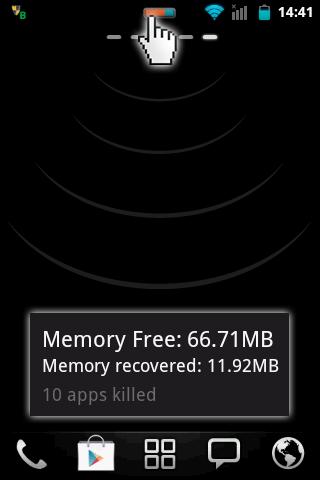
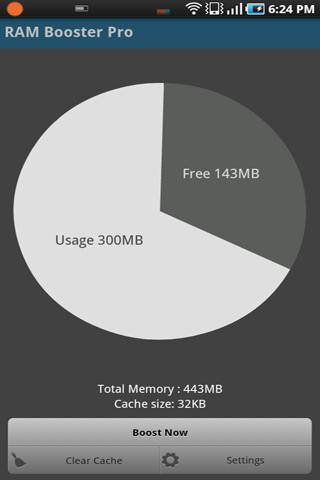
Smart RAM Booster for Android Phones and Tablets Smart RAM Booster for Android Phones and Tablets

Tool:

1-click cache cleaner
  • There are plenty options from app’s settings to twist boosting process:
  • Boost level: select a boost level
  • Nice themes at your choice
  • Whitelist apps: apps will not be killed when boosting
  • Boost automatically: auto-boost, come with minimal RAM threshold and Boost interval
  • Report style- define how to show reports
  • Feedback- a haptic feedback when touch on boost widget
  • Overlay widget position/size - Change overlay widget position/size
  • Overlay widget transparency- Change transparent/opaque level
  • OnClick/OnLongClick options for overlay widget.
  • Remember last selected apps to be killed
Download:

Smart RAM Booster APK Link
Read More

MP3 Cutter for android Devices

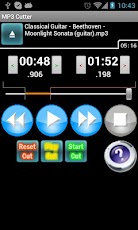
MP3 Cutter for android Devices it helps you to cut favorite part of your mp3 music and use it as your phones ringtone. It is really cool application for android phone. Cut the best part of your MP3 song and use it as your ringtone.The cut results are stored is "sdcard/media/audio/". Apps can't work with the youtube downloader that download mp4 file and rename the extension as mp3 (it will show error code 2).


Download:
                  MP3 Cutter APK Link
OR
                 Google Play Link
Read More