Powered by Blogger.

How to use facebook in your own language

How to use Facebook in your own language.At present pace book is supporting 76 different languages (approx).For the people of different region and language. As facebook is one of he most popular soical network site so also it support lots of language all around the world.


List of languages supported by facebook
Language list
Afrikaans
KiswahiliSwahili [beta]
English (US)
Azərbaycan diliAzeri [beta]
Bahasa IndonesiaIndonesian
Bahasa MelayuMalay
Filipino
Korean
Georgian [beta]
Azərbaycan diliAzeri [beta]
Czech
Georgian [beta]
MagyarHungarian
BosanskiBosnian [beta]
Catalan
Cymraeg Welsh
Danish
German
Estonian [beta]
English (UK)English (UK)
Spanish (Spain)
Kurdish [beta]
Turkish
Hebrew
Arabic
Spanish
Polish
Romanian
Russian
Slovak
Japanese
Thai
Vietnamese
Simplified Chinese (China)
Traditional Chinese (Taiwan)
Traditional Chinese (Hong Kong)
Pashto [beta]
Persia
Euskara Basque
Føroyskt Faroese [beta]
French (France)
Frisian Frisian [beta]
Gaeilge Irish [beta]
Galego Galician [beta]
Hrvatski Croatian
Icelandic [beta]
Armenian [beta]
Pashto [beta]
Nepali [beta]
Hindi
Bengali
Punjabi
Portuguese (Brazil)
French (Canada)
Tamil
Telugu
Malayalam
Armenian [beta]
Nepali [beta]
Hindi
Bengali
Punjabi
Slovenian
Belarusian [beta]
Bulgarian
Ukrainian [beta]
Albanian [beta]
Finnish
Swedish
Greek
Macedonian [beta]
Serbian
Italian
Latvian [beta]
Lithuanian
latinaLatin [beta]
Dutch
Norsk (bokmål)Norwegian (bokmal)
Norsk [beta]
(Portugal)Portuguese
sorry if i committed any wrong as the list of language was very big.
Now how to use facebook in your own language.
After log in to your facebook account scroll down to the button and see for English(US).

When you click on it a new window appears where you can select your language by double clicking on language name. Next how to change color of facebook .

Don't forget to leave Comment.
Read More

How to create Android app for your blog

Creating an Android App for your blog that runs on android phone, tablets and PC is very easy.To Download App of Our previous  click here

As we all know that now a days Android is very popular and is commonly used by the people all around the world So why don't you create an Android app for your blog it is really easy and free. Create your own free mobile blog app for the android marketplace. This App will let reader of your blog stay updated with your blog news from their Android based gadgets like android phones, Android Tablets and Android PC.
I hope now you are thinking that for building an App for Android for your blog you must know programming language but you will feel relaxed if i say that no you don't have to be programmer to build an Android App for your blog. To build Android App for a blog the only requirement is that you must have your own blog.
Simple steps that can build an Android app for your blog.
Enter your blog's RSS url in the form or your blogs URL
Customize your App like (your information's, App icon and App background ) at the same time you can select to distribute your app free to Android Marketplace. Create it.
And test it.
Building your App:
Visit the site Free Blog Apps to create yours blog App it will be created online and free.

Enter your blog's RSS url in the form or your blogs URL and click on NEXT>>

Next provide the information about yourself along with mail address and description

Next select the icon of your own choice which suits best for your application.

Next select Background for your application and below that send to android marketplace if you like and accept of term of use.

Now just click on finish. All done ready to share your blog app for android phones and etc.
Dont forget to leave comment
Read More

How to backup Bookmarks

How to backup Bookmarks from Mozilla FireFox 3

Bookmarks are very useful to all of us it is a simplest way to remember the important web site that we visit. We always visit new site for searching whatever information we need through search engine like Google, Bing, yahoo etc. and if we find the site is useful we bookmark it.Simplest way to remember but problem arises when we have some problem in our computer and have to format it. Now big problem arises you loss all your bookmark after reinstalling the operating system.But there is one option always backup your bookmarks.
So here is step wise instruction
How to backup Bookmarks from Mozilla FireFox.
Open your Firefox
Click on Bookmarks from menu bar or alt+B from keyboard
Click on organize bookmarks or ctrl+shift+B from keyboard
Library window appears click on "Import and backup" tab or alt+I from keyboard a drop down menu appears
Now select "Export HTML" option or alt+E from keyboard now save window appears save it.
Now you can restore your book mark when ever you need.
To restore all the steps are same only last step changes here to restore back your book mark you will have to select "Import HTML" option or alt+I from keyboard and select the file you saved while exporting.
gow to save bookmark in Firefox 8.0 visit here
Dont forget to leave comment
Read More

Add g +1 to your website

How to add G +1 button to your website

Why to add +1 button to your site?
+1 can help your site to stand out.
+1 lets your visitors to recommend your content on search.
+1 lets visitors to share your content on G+. etc. anyways lets see how to add


Click Here
 There you will see Customize your +1 button and +Snippet. here we will only add +1 button.
Here you can select the size of your button according to your choice.Small (15px), Standard (24px), Medium (20px) & Tall (60px).
Next Annotation select from drop down menu bubble, inline (You may specify any width 120px and greater, but this preview will only display up to 450px.) & none.
Next select your language.
You can select advance for more option (Asynchronous, Parse, URL to +1, etc.)
Now your code is generated copy and paste the code into your site where ever you like see the example below
Read More

Android App on Windows PC

Run Android Apps on Windows PC

Play Android apps on your Win7 PC or tablet with BlueStacks App Player install talking tom cat on pc
At present BlueStacks has released a free version of emulation software that can run Android app on windows 7 pc and tablet and that allows ten applications to run right out of the box, and a further 26 can be added according to the company. At present it is available only for windows 7. Latter on support for Windows XP/Vista /mac may be available.
The first BlueStacks alpha can be downloaded from the official website.
BlueStacks
Don't forget to leave comment
Read More

"Gmail's" New Look, Now Available

Gmail with new look now available

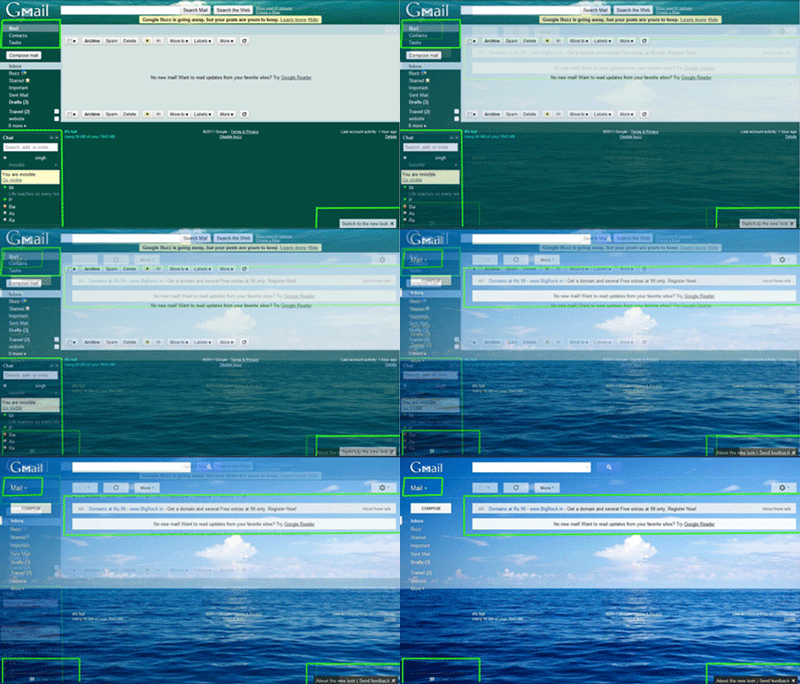
New look to Gmail you can switch to the new look just by clicking on the pop up on the right-side down corner.


Old to New Look Gmail
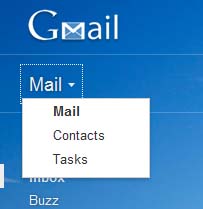
On the upper left side below the GMail-icon can switch between Mail, Contacts and Tasks.


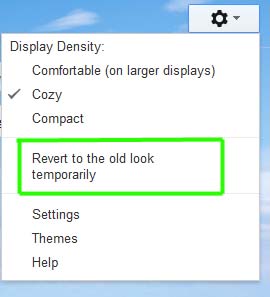
you can revert to old look if you want from the setting menu here you can change theme, settings, Display Density, etc.

Don't forget to leave comment
Read More

Download embedded SWF files.

Downloading SFW Files with Firefox
 How to download embedded swf files using firefox. As we know that we need additional software to download swf files that are on webpages but here i am going to show you how to download swf files that are embedded on the webpages without using any additional software.


How to download swf files using Firefox.

  •   Download firefox and install to your pc.
  •   Lunch Firefox and navigate to the Webpage that contains the embedded  swf file.
  •   when the page is fully loaded right click on empty space anywhere on the page and select the page info option. As shown below -
  • On clicking  on view page info page info menu will appear, now select Media from the tab.
  • Now select the swf file that you want to download from the list it's type will be embedded.
  • After selection of the file click on Save As button to save swf file to your computer.see the picture below-

 After download  complete you can simply open with your web browser and enjoy it offline.
Don't forget to leave  comment

Read More