Powered by Blogger.

Simply Young Vol 1.7 Custom Rom for galaxy y with 8 Lockscreens

As i told in my earlier posts that galaxy y is one of the most popular smartphone from Samsung So here is a new Rom for  galaxy y  Known as Simply Young Vol 1.7 Release + 8 Lockscreen developed by  arbylaw member of XDA forum So thanks him for his work.So first of all lets us take look on few screen Shots of galaxy y running on Simply Young Vol 1.7 Custom Rom.
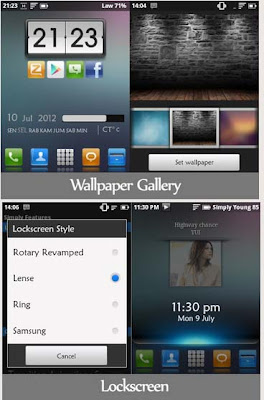
ScreenShots:
Simply Young Vol 1.7 Custom Rom for galaxy y with 8 Lockscreens
Features:
  • Based DXLE1
  • A2sd
  • Kernel Repencis support droidwall, 3 Frequency, 17 Governor, 5 I/O (Credits to Fedy Kusuma)
  • White Status Bar, White Settings
  • Add 6 Lockscreen (Thanks to Creed, for the Tutor)
  • Add Swipe to Remove notification
  • Smart Keyboard Pro as default Keyboard (delete stock Keyboard)
  • Flashlight working
  • Mms Cyanogen (no fc)
  • Gallery3D Cyanogen (smooth, but…)
  • Add MIUI icon pack
  • And many more.. (You will know if you try it)
  • Warnings:Use at your own risk!

Download 
 Link( not mirrored): Simply Young Vol 1.7.Zip

Installation:
Just like other Custom Rom's for details Click here
  • Put “zz_Update_Simply_Young_Vol_1-7.zip” on your sd card
  • Flash it via CWM Recovery
  • Do Wipe data and Cache
  • Reboot
  • Just Wait. The first boot will take about 3 - 5 minutes
  • Finish
Enjoy
Read More

Andromeda v.1.0 Rom for GT-s5360 galaxy y

New Rom For Samsung galaxy y Andromeda v.1.0 Rom .This custom Rom is developed by member of XDA forum AliensDroid so don't forget to thanks him. .This Rom is fully TWEAKED, FAST, SMOOTH and STABLE. So before proceeding lets take look on few  screen shot of Andromeda v.1.0 Rom running on galaxy y.

screen shot
Features:

  • Rooted
  • Deodexed all system apks
  • Based Rom DXLC1
  • Zipalign all apks on boot
  • Init.d script support
  • A2sd Darktremor
  • holo launcher
  • EDT Tweak + 15 toggle on status bar
  • New audio boster bass with DSPmanager
  • new animation transtition
  • milocker
  • with andromeda parts
  • andromeda artwork (ui & animation)(ics style)
  • And many more.
Download:
         Link Andromeda.zip
OR
         Here Andromeda.zip

Warning:
Use at your own risk!

Installation Instruction:
  • Boot in Stock Recovery (hold Volume up + HOME + Power Button Simultaneously)
  • instal cwm merruk
  • Select "wipe data/factory reset" proceed to "YES"
  • Select "wipe cache partition"
  • Select "install zip from sdcard"
  • Select "Andromeda v1.0.zip"
  • Reboot your phone.
Enjoy
Read More

Internet Accelerator for android phone and Tablets

Internet Accelerator - The Best App. Speed ​​up internet speed of android phones and tablets, simply press the green button.It works on 2G, 3G, EGDE, GPRS, UMTS, HSDPA, LTE, WIFI ...
Internet Accelerator for android phone and Tablets
Creating an app takes time and money, In order to keep creating great (and free!) apps, we are using a new search service to monetize our apps. With this service we are able to create more great apps for you guys. This option bundles a few search points (icon, bookmark and homepage) for you to use. You can erase these easily and with no effect to our app.

ScreenShot:


Download Link

Google Play

Read More

Caller Location INDIA

Know the location of the person who is calling you.Want to know the caller's base location. Best APP for Indian Callers.Shows the caller's base location of all calls coming from INDIA.Latest Database of numbers: Updated July 2012This app is a superior version of caller ID. This application shows an overlay on the Android incoming call screens.This app shows base location of calls originating from the INDIAN sub-continent only.By using this app you can know the base location of an incoming number.This application has many advantages over the Standard Caller ID and Mr. Number Caller ID.
No Internet connection is needed for this app. This app can be run offline.

Screen Shots:
Caller Location INDIA
Download link

Google play

Read More

Angry Birds updated to New levels

Angry Birds updated to New levels now with power ups! Use the unique powers of the Angry Birds to destroy the greedy pigs' fortresses! The survival of the Angry Birds is at stake. Dish out revenge on the greedy pigs who stole their eggs. Use the unique powers of each bird to destroy the pigs’ defenses. Angry Birds features challenging physics-based game play and hours of replay value. Each level requires logic, skill, and force to solve.If you get stuck in the game, you can purchase the Mighty Eagle! Mighty Eagle is a one-time in-app purchase in Angry Birds that gives unlimited use. This phenomenal creature will soar from the skies to wreak havoc and smash the pesky pigs into oblivion. There’s just one catch: you can only use the aid of Mighty Eagle to pass a level once per hour. Mighty Eagle also includes all new gameplay goals and achievements!
In addition to the Mighty Eagle, Angry Birds now has power-ups! Boost your birds’ abilities and three-star levels to unlock secret content! Angry Birds now has the following amazing power-ups: Sling Scope for laser targeting, King Sling for maximum flinging power, Super Seeds to supersize your birds, and Birdquake to shake pigs’ defenses to the ground!

Screenshots:


Download Link

OR

Google Play
Read More

ad4game


Read More

Google Translate For Android phones and Tablets Translate Text From Photos, Instant Translation As You Type [updated]

Translation apps are very popular among travelers because of, their ability to translate foreign languages into their own language of choice with a good amount of accuracy. Apps available on smartphones and tablets reflect this, with them being among the top apps under Lifestyle / Utilities.Google Translate is, arguably, the most well known translation service in the world. They have desktop web apps and native mobile apps for iPhone and Android. Now, Google has released a major update to Translate for Android that includes a handful of amazing new features. Check them out after the jump.

Translate text between more than 64 languages.Translate words and phrases between more than 64 languages using Google Translate for Android. For most languages, you can speak your phrases and hear the corresponding translations.

With Google Translate you can:
  • Translate text between 64 languages
  • Translate by speaking the text instead of typing it (17 languages)
  • Use camera to take a picture and brush text to translate (available on Android 2.3 and above).
  • Listen to your translations spoken aloud (40 languages)
  • Communicate with another person using speech-to-speech translation in Conversation Mode (ALPHA, 14 languages)
  • Display translations in full screen mode to make it easier for others nearby to read
  • Star your favorite translations for quick access even when you’re offline
  • Access your translation history even when you’re offline
  • Spell out the translation of non-Latin script languages (e.g. Chinese, Japanese, etc..) in Latin characters to read it phonetically (e.g. Pinyin, Romaji)
  • View additional dictionary results for single words or short phrases
  • Push the handwriting button and simply write what you want to translate
Translations between the following languages are supported:

Afrikaans, Albanian, Arabic, Armenian, Azerbaijani, Basque, Belarusian, Bengali, Bulgarian, Catalan, Chinese (Simplified), Chinese (Traditional), Croatian, Czech, Danish, Dutch, English, Esperanto, Estonian, Filipino, Finnish, French, Galician, Georgian, German, Greek, Gujarati, Haitian Creole, Hebrew, Hindi, Hungarian, Icelandic, Indonesian, Irish, Italian, Japanese, Kannada, Korean, Latin, Latvian, Lithuanian, Macedonian, Malay, Maltese, Norwegian, Persian, Polish, Portuguese, Romanian, Russian, Serbian, Slovak, Slovenian, Spanish, Swahili, Swedish, Tamil, Telugu, Thai, Turkish, Ukrainian, Urdu, Vietnamese, Welsh, Yiddish

Download Link
Read More