Powered by Blogger.

Change font size of android phone samsung galaxy y

Tutorial how to Change font size of Android phone samsung galaxy y
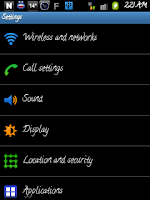
As in the earlier post i have written how to change fonts of Android phone for free click here if you missed it.
(See both the picture having different font size one normal and second large.)
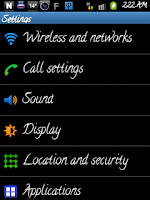
As you know that when we change fonts some fonts look big or small so for this we will have to adjust the size of the font . Changing font size of android device is very easy with this application. So here i am going to tell you how to change the font size of your android device for free.
Simply follow the steps below :-
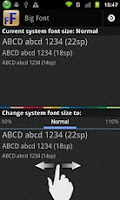
First of all you will have to download an application from market click here to download Big Font
Install it on your phone.
Run the application now you can scale system font size from 85% to 130% just scroll left and right to adjust the font size as you wish.
when you are satisfied click on apply and then ok.
Is it helpful leave comment
Read More

Changing or installing fonts on samsung galaxy y an Android phone

How to change or install fonts on samsung galaxy y an Android phone successfully and free.

As we can change font style of our computers to get different look so also we can change font of our Android phone and achieve different and beautiful look. There are lots of fonts on android market but the one here is free and have some good fonts as shows in the picture taken from galaxy y. So how to change the font of Android phone. I will tell you how to use without rooting the handset.For changing font size click here
Steps to install new fonts which can be changed back to default when ever you like:
Click on the link below to download:
Font for Galaxy SP
Install this application on Android phone. Run the application and click on F at the center of the screen

This will bring new menu screen where fonts are categorized in alphabetical order A to Z select any one here i select "c"

The screen move to new menu and then select the font of your own choice Here i select "Calligraffiti" you can choose of your own choice the font will be downloaded now install the font.apk or whatever the name is . As now font is install on your android phone you will have to apply it .

So to Apply the font go to phone Home> Settings>Display>Screen Display>Font Style.

Here you will find font selection screen select the font by clicking on the font that you want to apply a conformation box appears click on ok . your phone will restart to apply changes. Now enjoy new font on your mobile............
To change font size click here
Read More

Aakash tablet Cheapest Android Tablet Now Available

Aakash tablet Cheapest Android Tablet Now Available.

Great news Aakash tablet the student version is now available and can be bought online according to the official site the price of Tablet is Rs.2,500/- the lowest price tablet powered with Microprocessor Arm11 – 366Mhz OS is Android 2.2 and network is WiFi..Which will be delivered in seven days and the payment mode for the tablets is cash on delivery.
Another version is commercial version named as UbiSlate 7 (The upgraded version of Aakash) it will be available around late January but you can still pre book it according to the official site the price of UbiSlate 7 will be Rs.2,999/- it will be powered with Cortex A8 – 700 Mhz Microprocessor, Android 2.3 and WiFi & GPRS (SIM & Phone functionality). The commercial version will also have an option of 3G. External 3G dongle.
Aakash tablet configuration
Memory : 256MB RAM / Storage (Internal): 2GB Flash
Storage (External): 2GB to 32GB Supported
Audio out: 3.5mm jack / Audio in: 3.5mm jack
Display and Resolution: 7 display with 800x480 pixel resolution
OS: Android 2.2
Supported audio formats: MP3, AAC, AC3, WAV, WMA
Supported video formats: MPEG2, MPEG4, AVI, FLV
Read More

Listen music on Android phone samsung galaxy y with mono Bluetooth headset

How to Listen music on Android phone samsung galaxy y with mono Blue-tooth headset successfully


As Android phone is powered with Blue-tooth V3.0 with A2DP, HS when we connect mono Blue-tooth headset we can only listen to incoming or outgoing call but we cannot listen music or video that are playing on the handset the sound comes from phone speaker so how to route the sound of listen music or playing video to mono headset. As many people have mono headset and don't want to use wired headphone or stereo Blue-tooth headset as it is not easy to carry with them, but cannot get good quality with mono headset if listening to music but easy to carry.
So if you want to listen to music through mono Bluetooth headset follow the steps below it is really easy
For listening to music through mono headset on Android phone
You will need to install an application from Android market which lets you Listen to music, internet streams (you-tube) with your Blue-tooth mono headphones!
Now there is two version one trial free for 5 days and other paid so before buying you can try it.
To download trial version visit the link below
Download Trial version of Bluetooth Audio Widget

To download Paid version visit the link below
Bluetooth Audio Widget paid
Steps to use


Install Bluetooth Audio Widget on your samsung galaxy y or any android phone
Turn on Bluetooth of your handset make it discoverable which will be for 120 seconds.
Now turn on Bluetooth headset click on scan Devices when you get your device pair it password will be "0000" without commas.
Now your Device is paired but the most important step go to home screen of your phone press to 3 second menu appears Add to home screen click on widgets now scroll down and select Bluetooth Audio Widget This will bring widget to home screen so you can easily route sound to headset.
Now as your headset is already connected to your phone play a music you will get sound from phone speaker then simply click on the icon just now we placed on home screen wait for few seconds and you will find that sound is routed to headset now enjoy the music and thanks to KocasIT.
Don't forget to leave comment feel free to ask if.
Read More

Galaxy y battery life problem

Galaxy y S5360 battery life problem solved to some extend !

When i first used this phone i found that its battery does not last long and need to be charged twice a day. Even after killing the applications that are running in background and decreasing the brightness of the screen but now the battery life get increased and not needed to be charged frequently. On the first use with stock 2.3.5 Gingerbread i found that the life of battery fully charged is not more then 3-4 hours when we use the phone continuously but with the latest update of the firmware that released on 02/12/2011 update version 2.3.6 Gingerbread with KK1 and now KL1the battery life get increased and can be used for longer period then before but still follow the steps below to save consumption of battery to download the latest version of phone firmware updater visit the official site Click here
Necessary steps that can save battery:
Turn off unnecessary connectivity options like wifi, gps, blue-tooth, etc. when not in use.
Decrease brightness of the screen.
Do not run app like live wallpaper.
Stop auto update of applications .
For specification of galaxy y S5360 click here
Read More

Galaxy y review

Galaxy Y S5360 one of the low price smart phone.


 This is one of the entry level smart phone although it is powered with 832 MHz processor, 290 MB of RAM and 190 MB internal Memory And supports up to 32 GB external memory and above all it comes with latest version of Android 2.3.5 (Gingerbread) new update is also available for it Android 2.3.6 (Gingerbread) from 2/12/11 which can be updated with help of kies. It has 3" screen and resolution of 240x320.It has 2 MP camera maximum 1600x1200 resolution. It Bluetooth is 3.0 high speed has WiFi and AGPS too.
Band
GSM&EDGE Band: 850/900/1,800/1,900MHz
3G Band: 900/2,100MHz
Network&Data
GPRS: 850/900/1,800/1,900 (Slave)
EDGE: 850/900/1,800/1,900 (Master)
3G : HSDPA7.2
Video Player
3GPP/H.263/H.264/MPEG4
Music Player
MP3/AAC/AAC+/AMR/AMR-NB/eAAC+ with 3D Sound Technology head phone support 5.1 channel sound effect
So we can say that it is good entry level smart phone only lacking some features such as GPU.
Read More

Mount OS X HFS partition on windows

How to mount HFS partition on windows.

As we know that windows can mount its own native file system like fat, Ntfs but to mount HFS partition on windows we have to use extra software to access Mac disks from desktop, Windows explorer.We can mount HFS partition as read write with this software can partition, format and repair disk too.As this is not free version you can use trial version.To download the trial version go to the official website Mediafour or click on the link below
MacDrive Standard
After download just install the application and restart your pc lunch the application click on Access HFS partition and then View mac disk in windows explorer your explorer will open and the drive with mac will appear with red apple icon .This is how you can mount mac disk in read write mode in windows.
Read More